How to Switch to eCareHealth: A Mental Health EHR Migration Guide Without Losing Revenue

Replacing an EHR should not feel like gambling with patient care or your practice’s revenue. Even so, this is exactly how it feels for many behavioral health organizations.
An outdated system can slow down documentation and create billing bottlenecks, while making everyday tasks even more difficult. Yet, many practices still choose to live with those challenges rather than making a change. The major reason behind this is that they are worried that switching leads to lost patient records, billing delays, staff disruption, or reduced cash flow.
And as a result, they put off an upgrade even when their current EHR creates even more problems than it solves. The reality is that migrating to mental health EHR software does not have to disturb your practice.
A successful transition is not just about taking risks; it’s actually about following a structured migration process. Careful planning and the right implementation approach help behavioral health organizations to protect patient data and maintain clinical workflows, while keeping revenue flowing throughout the transition.
Here, you might be wondering about: What does a successful migration actually look like, and where should your practice begin?
To find out answers to your questions, let’s walk through the blog to know more about the key steps, common pitfalls, and best practices for successfully switching to eCareHealth, so your practice can make the move with confidence, without disrupting patient care or losing revenue.
Step 1: Assess Your Legacy System Before Migrating to a Mental Health EHR
Before migrating to a mental health EHR, you should take a close look at your current system. If you understand what exactly is holding your practice back, then you can easily ensure the new EHR solves existing challenges, rather than carrying them forward.
You can start by reviewing:
- Clinical workflows and patient records
- Appointment schedules and calendars
- Billing data and financial reports
- Documents, templates, and existing integrations
However, don’t ever stop at auditing. To perform legacy electronic health records data cleanup for clinics, this is the perfect time. By removing duplicate records, updating incomplete information, and organizing historical data, only accurate information is allowed to move into the new system, helping ensure a smoother implementation with eCareHealth.
And lastly, to make the final decision, you must determine which records should be migrated, securely archived, or retained to meet compliance requirements. Starting with clean, organized data makes the transition to eCareHealth seamless and significantly reduces post-migration issues.
Step 2: Build an EHR Data Migration Checklist and Migration Plan
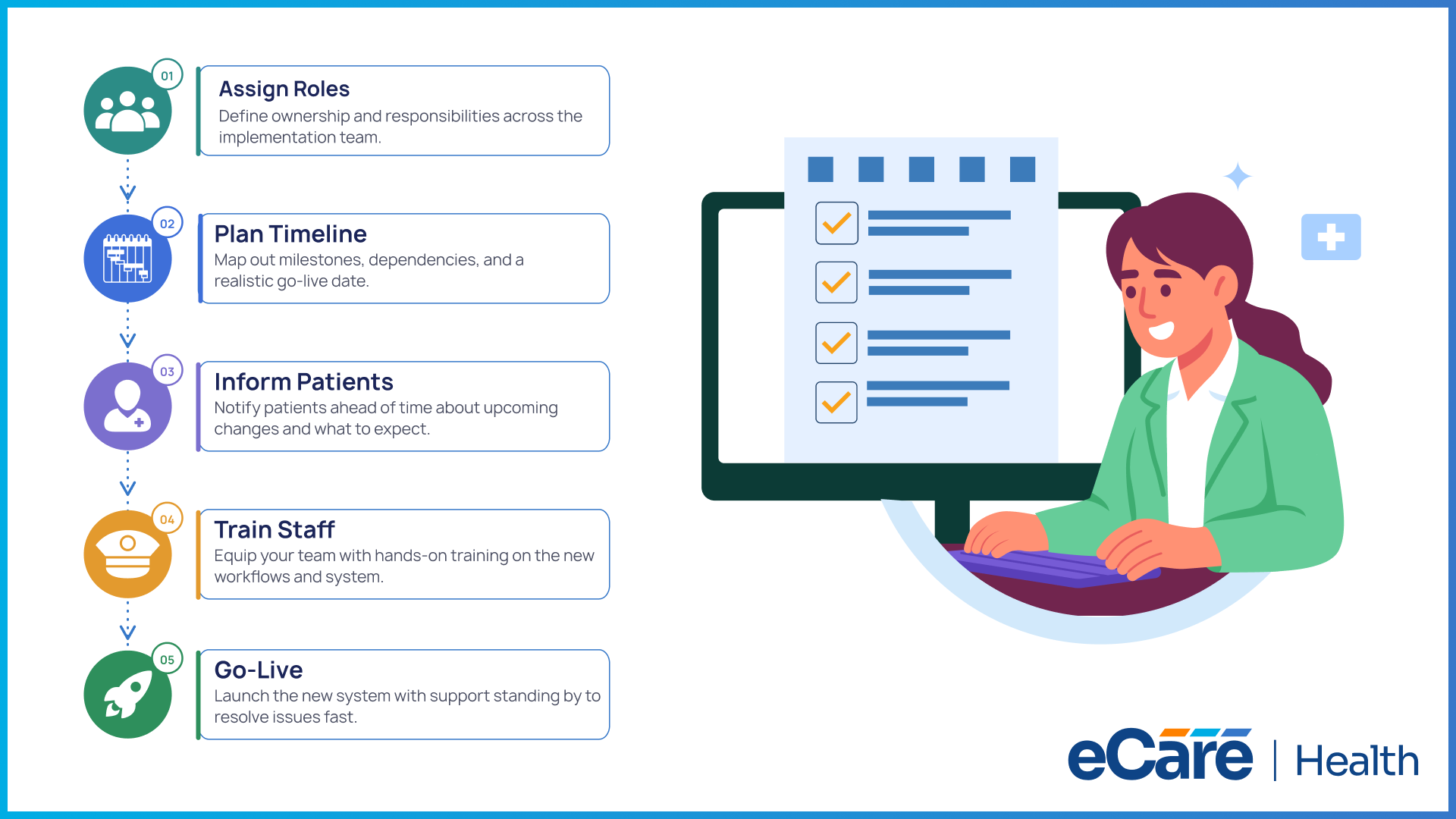
After cleaning and organizing your data, the next step is to create a plan that keeps everyone aligned. Before implementing eCareHealth, a well-defined EHR data migration checklist helps ensure that nothing is overlooked while reducing surprises on migration day.
Before finalizing your migration plan, it’s also worth reviewing the key factors involved in selecting the right mental health EHR. Our guide on How to Choose the Best Mental Health EHR: A Complete 2026 Buyer’s Guide can help you evaluate workflows, scalability, implementation, security, and long-term value before making the switch.
Before moving ahead, your migration plan should always answer the following questions:
Who is responsible?
You should assign clear ownership for clinical workflows, data validation, billing, IT coordination, and staff training, so that every task has someone accountable.
What needs to happen and when?
You should break the migration into realistic milestones like data extraction, testing, staff training, go-live, and post-launch support. Along with this, equally important is defining a rollback plan in case any unexpected issues need a temporary return to the legacy system.
How will patients be informed?
If the migration affects appointments, the patient portal, or communication channels, notify patients in advance. By setting clear expectations, you can maintain trust while minimizing disruptions.
Is the practice ready for change?
Here, the first important thing you need to do is to understand that a successful behavioral health software transition is not just about moving data; it’s about preparing your team. You must ensure that your staff understands the migration timeline, knows exactly what to expect, and has access to the training and support they need before go-live.
Step 3: Extract, Clean, Map, and Validate Clinical Data
With a migration plan in place, it’s time to move your data, but here you should not rush. As clinical data is the backbone of your practice, every record should be transferred with more accuracy and care.
The process typically follows the following four stages:
- Extract: Always start with secure legacy medical records extraction from your existing EHR. Without compromising data integrity, patient demographics, appointment history, progress notes, treatment plans, assessments, billing records, and supporting documents must be exported.
- Map: After extraction of data, start with mapping each field to its correct location in the new system. This helps to make sure that information appears exactly where clinicians expect to find it, while reducing confusion after go-live.
- Validate: Before directly importing everything into production, always test a sample of migrated records. Along with this, equally important is verifying that patient charts, clinical documentation, billing details, and attachments are complete and accurate. For safely transferring patient charts during behavioral health software migration, this step is critical.
The final migration takes place only when the data has been validated. If you take your time to verify every detail, it helps you ensure a seamless transition to eCareHealth while reducing clinical and operational disruptions.
Step 4: How Can You Switch Mental Health EHR Systems Without Losing Revenue?
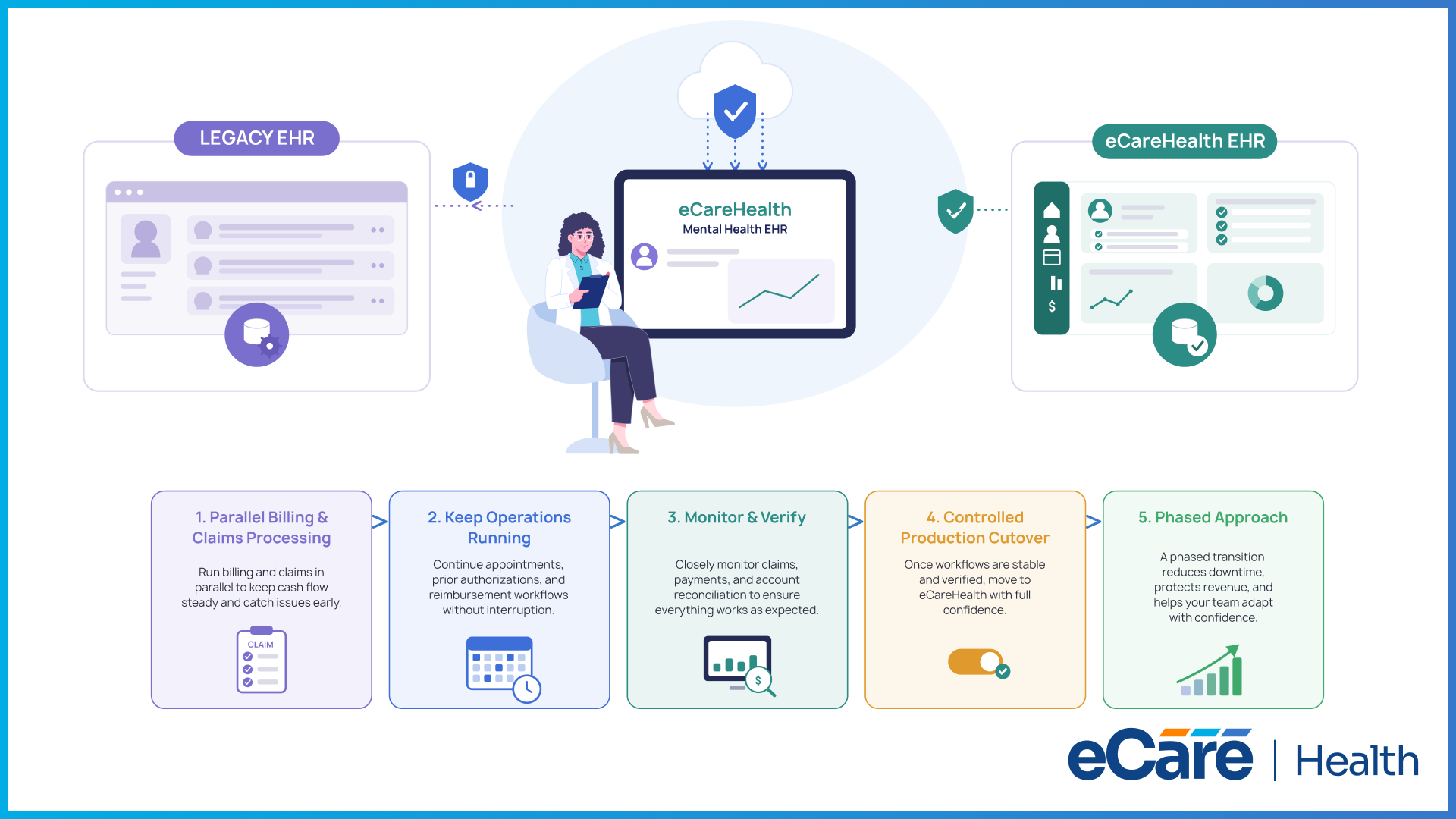
It is a fact that revenue loss does not happen when an organization decides to switch EHRs; it usually happens when the transition is not planned properly. Keeping critical financial and clinical operations running while the migration takes place is a strategic key to switching EMR platforms without losing revenue.
Running billing and claims processing in parallel during the transition is one of the most effective ways to do this. Because of this, your team can continue submitting claims and tracking payments while identifying issues before they affect cash flow. Additionally, without any interruption, scheduled appointments, prior authorizations, and reimbursement workflows must continue so that patient care is not compromised.
Before fully moving to eCareHealth, it is necessary to closely monitor claims, payment posting, and account reconciliation so that it can be confirmed that everything is functioning as expected. You can complete a controlled production cutover when your team is confident that clinical and financial workflows are stable.
A phased approach can help to reduce downtime, protect revenue, and help staff adapt to the new system with confidence.
Step 5: Verify Migration Success and Optimize Your New EHR
Going live with eCareHealth is such a major milestone, but it is not the finish line. After implementation, the first few weeks are an opportunity for you to confirm that every part of the system is performing well and to fine-tune workflows before they become everyday habits.
You can use the post-migration periods to verify:
- Patient records and clinical documentation
- Appointment scheduling and calendar availability
- Billing workflows and claim submissions
- User roles, permissions, and system access
However, verification is only half of the story. To identify areas that need attention, you should also track system performance, clinician adoption, and data quality. Along with this, you should also encourage your staff to report issues earlier, resolve them quickly, and use their feedback to enhance workflows.
All these small adjustments made during the first weeks can result in better efficiency, seamless operations, and greater long-term value from your eCareHealth investment.
Conclusion
A successful behavioral health EHR migration is built on careful planning, clean data, and a strategy that protects both patient care and revenue. By assessing your current system, validating clinical data, and following a structured migration plan, your practice can make the transition with confidence while avoiding unnecessary disruptions.
Whether you're replacing an outdated system or planning for future growth, eCareHealth provides the implementation support and modern technology needed to simplify the process.
Explore Mental Health EHR solutions from eCareHealth and take the next step toward a more connected, scalable, and efficient behavioral health practice.
Frequently Asked Questions
1. What is the first step when migrating to a mental health EHR?
The first step is to assess your current EHR system and identify why a migration is needed. Review clinical workflows, patient records, billing processes, reporting capabilities, and existing integrations to understand what should be improved. This evaluation also helps determine which data should be migrated, archived, or retained.
2. What should be included in an EHR data migration checklist?
A comprehensive EHR data migration checklist should include data auditing, data cleanup, migration timelines, project ownership, backup and rollback plans, testing procedures, staff training, patient communication, and post-migration validation. A well-defined checklist helps ensure a smooth transition while minimizing operational disruptions.
3. How can clinics switch EHR systems without losing revenue?
Clinics can reduce the risk of revenue loss by planning the migration carefully, running billing and claims processing in parallel during the transition, protecting appointment schedules, and monitoring reimbursements before retiring the legacy system. Validating financial workflows before full deployment also helps maintain consistent cash flow.
4. How do you safely transfer patient charts during a behavioral health software migration?
Patient charts should be transferred using secure data extraction and validated mapping processes. Before the new system goes live, clinics should verify that demographics, clinical notes, treatment plans, assessments, billing information, and attached documents have been migrated accurately and completely.
5. What data should be migrated from a legacy behavioral health EHR?
Organizations typically migrate active patient records, demographics, appointment histories, clinical documentation, treatment plans, assessments, billing records, insurance information, consent forms, and other essential documents. Older records that are no longer needed for daily operations may be securely archived while remaining available for compliance purposes.
6. How long does switching mental health EHR systems typically take?
The timeline depends on the size of the practice, the volume of patient data, system complexity, and the number of integrations. Small practices may complete the process within a few weeks, while larger behavioral health organizations with multiple locations may require several months for planning, migration, testing, and staff training.
7. What are the biggest risks during a behavioral health software transition?
Common risks include incomplete data migration, billing interruptions, workflow disruptions, user adoption challenges, and temporary productivity declines. These risks can be minimized through careful planning, thorough testing, staff training, and continuous monitoring during and after the migration.
8. How do clinics validate migrated patient records before go-live?
Clinics validate migrated records by reviewing sample patient charts, comparing data with the legacy system, testing documentation workflows, verifying billing information, and confirming user permissions. Resolving discrepancies before production deployment helps ensure data accuracy and clinical continuity.
9. What should organizations monitor after completing an EHR migration?
After migration, organizations should monitor system performance, user adoption, patient records, scheduling accuracy, billing workflows, claims processing, data quality, and staff feedback. Ongoing monitoring helps identify issues early, optimize workflows, and ensure the new EHR continues to support both clinical and operational goals.