


Practice Management Software

Run Your Practice Without Repeating the Work

From scheduling and patient intake to check-in and follow-up, manage your practice from one connected platform so your front desk spends less time re-entering information and more time keeping the day moving.

Start Your 2 Weeks Free Trial. Unlock All Features. No Credit Card Required.
HIPAA Compliant
SOC 2 Type II
ISO 27001
G2: 4.5 out of 5 stars Capterra: 4.5 out of 5 stars
Practice Management Challenges

Why Medical Practice Management Gets Complicated

When scheduling, registration, check-in, and communication tasks live in different places, even simple tasks can become repetitive and create extra work for your team.

01
Scheduling

Scheduling Bottlenecks

Manual confirmations, cancellations, rescheduling, and provider availability can leave staff constantly adjusting the schedule.
The calendar is never finished, so nobody else’s work starts on time.
02
Intake

Time-Consuming Patient Intake

Paper forms and repeated data entry slow down registration and create unnecessary work at the front desk.
A queue builds at the window while a form is retyped.
03
Front desk

Too Much Front-Desk Administration

Staff spend time checking information, moving documents, answering messages, and coordinating tasks instead of helping patients move through the practice.
Coordination work crowds out patient-facing work.
04
Visibility

Disconnected Staff Workflows

When information sits across multiple systems, teams have less visibility into what’s happening and more opportunities for things to fall through the cracks.
Nobody has one view of the day as it is actually running.
Connected Practice Operations

One Practice Management Platform to Keep Your Workflows Running

Connect scheduling, registration, front-desk tasks, communication, documents, and reporting in one place, so your team can manage the practice without jumping between systems.

01

Schedule

Recurring visits, multiple providers, and multiple locations on one calendar, with a waitlist for cancellations.

02

Register

Patients complete intake, demographics, and consent forms online before the visit, straight onto the record.

03

Check In

Insurance eligibility and patient details are confirmed at the front desk, or by the patient from their own phone.

04

Communicate

Appointment reminders by SMS, email, and automated voice, plus secure two-way messaging through the portal.

05

Manage Documents

Forms, signed consents, and clinical documents filed on the patient record, where your staff already work.

06

Monitor Operations

Schedule, visit, and collections activity by provider and by location, without exporting to a spreadsheet.

Key Practice Management Features

Practice Management Software Features Your Team Uses Every Day

Keep scheduling, registration, front-desk tasks, communication, documents, and reporting connected in one place with eCareHealth practice management features, so your team spends less time managing systems and more time managing the practice.

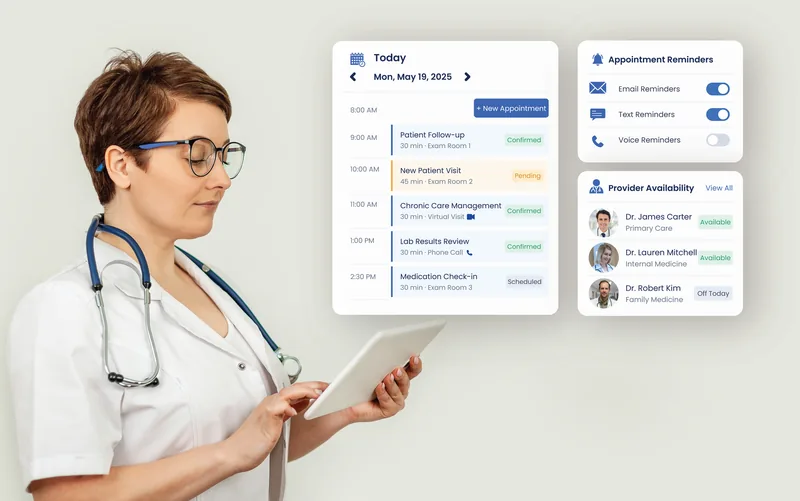
eCareHealth smart scheduling: a day calendar of confirmed and pending appointments beside appointment reminder toggles and a provider availability list
Smart Scheduling

Keep Your Schedule Moving

Give your front desk one place to manage appointments, provider availability, reminders, recurring visits, and schedule changes.

  • Centralized appointment scheduling
  • Automated appointment reminders
  • Provider availability management
  • Recurring appointment support
  • Schedule updates across the practice
  • Reduced scheduling conflicts
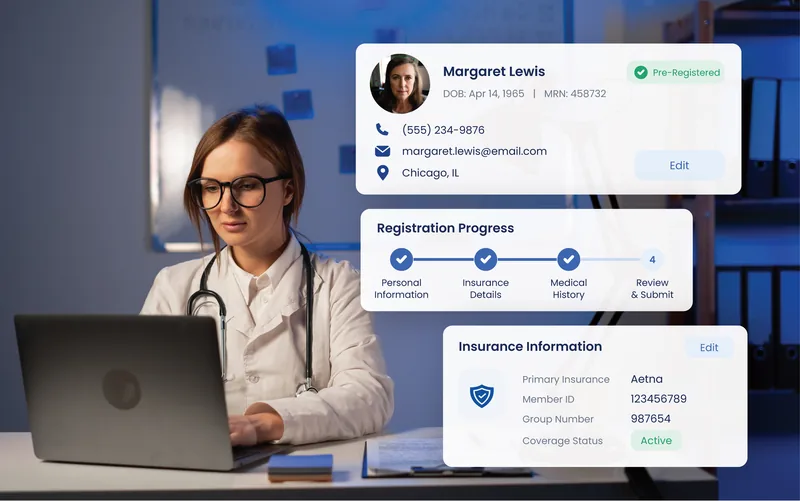
eCareHealth patient registration: a pre-registered patient record, a four-step registration progress tracker and captured insurance details
Patient Registration

Let Patients Complete Intake Before They Reach the Desk

Capture essential patient information digitally before arrival and make it available across the patient record and practice workflows.

  • Digital patient registration
  • Demographic and contact information
  • Insurance information capture
  • Digital forms and intake workflows
  • Reduced duplicate data entry
  • Centralized patient information
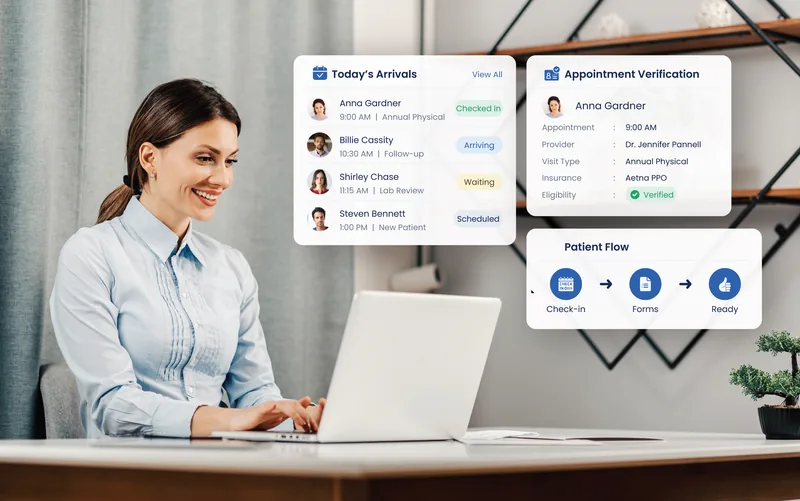
eCareHealth front-desk dashboard: today's arrivals with check-in statuses, appointment and eligibility verification, and a check-in to ready patient flow
Front-Desk Dashboard

Give Your Front Desk a Clear View of Every Arrival

Help staff manage patient flow from arrival through the start of the visit without searching across disconnected workflows.

  • Quick patient check-in
  • Digital intake and forms
  • Appointment verification
  • Patient status tracking
  • Front-desk visibility
  • Smoother patient flow
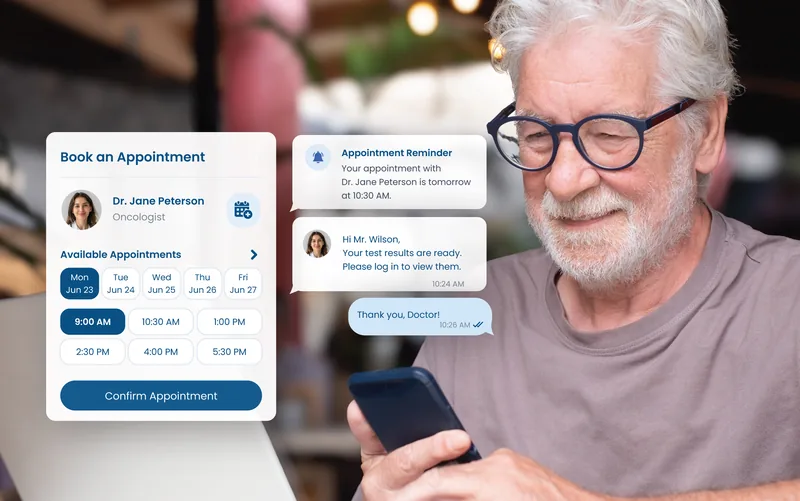
eCareHealth patient communication: a patient booking an appointment on a phone alongside an appointment reminder and a secure two-way message thread
Patient Communication

Keep Patient Communication in One Place

Make it easier to keep patients informed throughout their care journey with centralized communication tools and automated outreach.

  • Appointment reminders and notifications
  • Secure patient messaging
  • Care-related communications
  • Automated outreach workflows
  • Two-way patient communication
  • Centralized communication history
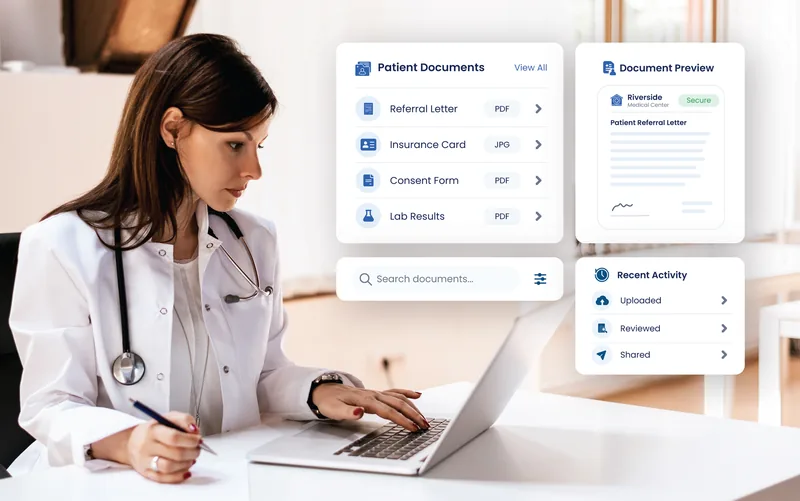
eCareHealth document management: a patient document list with referral letter, insurance card and consent form, a secure document preview and recent upload activity
Document Management

Put Every Patient Document Where Your Team Can Find It

Keep forms, referral letters, insurance documents, and other patient files organized and connected to the right patient and workflow.

  • Centralized document storage
  • Patient document organization
  • Secure document access
  • Digital forms and files
  • Easy document retrieval
  • Document activity tracking
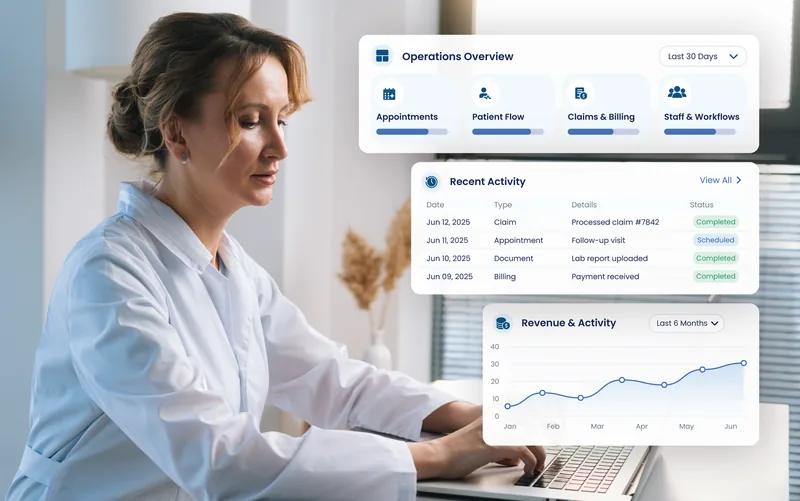
eCareHealth operations reporting: an operations overview of appointments, patient flow and claims, a recent activity log and a six-month revenue and activity chart
Operations Reporting

See Where Your Practice Operations Stand

Bring operational data and reporting into one place so practice managers can identify bottlenecks, monitor activity, and keep workflows on track.

  • Practice performance reporting
  • Appointment and utilization insights
  • Operational dashboards
  • Staff and workflow visibility
  • Revenue and activity reporting
  • Actionable practice insights

See How eCareHealth Helps You Manage Your Practice

Start Your 2-Week Free Trial. No Credit Card Required.
Outcomes

Practice Management Outcomes Measured After Switching

These are the numbers practices tracked in their first full quarter on eCareHealth — no-show rates, check-in time, and days to post a charge.

↓40%
Front-desk workload
Administrative work at the desk, Family Medicine practice.
↑35%
Faster patient check-in
From arrival to the start of the visit.
↓45%
Administrative coordination
Pediatrics practice, after connected reporting.
3-day
Staff onboarding
0 days of scheduling disruption, 100% record migration.

Figures reported by eCareHealth practices; individual results vary by panel size, specialty and starting workflow.

Trusted by Healthcare Practices

How Practices Simplified Daily Operations with eCareHealth

From independent clinics to growing practices, see how teams reduced administrative work and improved patient coordination.

Family Medicine · Independent Practice

eCareHealth gave our front desk one place to manage scheduling, registration, and patient communication. We spend far less time jumping between systems, and our team can keep the day moving without constantly checking different tools.

Portrait of Dr. Sarah Mitchell, family medicine practitioner, in a white coat with a stethoscope
Dr. Sarah Mitchell
Family Medicine Practitioner
−40% front-desk administrative workload+35% faster patient check-in+30% scheduling efficiency

A more efficient front desk from check-in to checkout

The Challenge
  • Scheduling managed across disconnected systems
  • Manual registration creating unnecessary front-desk work
  • Patient check-in slowing down busy clinic days
The Result
  • Centralized scheduling and patient registration
  • Faster check-in and smoother patient flow
  • Less administrative work for front-desk staff
−40%
Front-Desk Administrative Workload
+35%
Faster Patient Check-In
+30%
Scheduling Efficiency

Pediatrics · Private Practice

Before eCareHealth, our practice managers had limited visibility into what was happening across the day. Having scheduling, patient communication, and operational reporting connected in one platform made it much easier to identify bottlenecks and keep the practice running efficiently.

Portrait of Michael Reynolds, practice manager, in a white coat with a stethoscope
Michael Reynolds
Practice Manager
−45% administrative coordination+35% operational visibility+30% faster patient communication

Clearer operations with connected practice management

The Challenge
  • Limited visibility into daily practice operations
  • Manual coordination between front desk and staff
  • Patient communication spread across multiple tools
The Result
  • Centralized operational reporting and dashboards
  • Connected patient communication workflows
  • Better visibility across daily practice activity
−45%
Administrative Coordination
+35%
Operational Visibility
+30%
Faster Patient Communication
Multi-Specialty Clinic · Operations

We were concerned that moving to a new practice management system would disrupt our staff and patients. eCareHealth made the transition straightforward, with guided implementation and training that helped our team get comfortable quickly without interrupting our daily operations.

Portrait of Laura Bennett, clinic operations manager, in a white coat with a stethoscope
Laura Bennett
Clinic Operations Manager
0 days of scheduling disruption3-day staff onboarding100% appointment and patient record migration

A seamless transition to connected care workflows

The Challenge
  • Concerns around migration and operational disruption
  • Staff resistance to learning another system
  • Previous implementations requiring weeks of training
The Result
  • Guided implementation and structured team training
  • Faster adoption across front-desk and management teams
  • Connected scheduling, registration, and operational workflows
0
Days of Scheduling Disruption
3-day
Staff Onboarding
100%
Appointment and Patient Record Migration
Customer Stories

Real outcomes from real practices

How independent clinics, multispecialty groups, and multi-location healthcare networks reduced friction, lifted engagement, and unified interoperability with eCareHealth — verified results from real customers.

40-Provider Multispecialty Group cut scheduling friction by 62%
#practicemanagementMay 2026

How a 40-Provider Multispecialty Group Cut Scheduling Friction by 62%

A patient told a cardiologist she’d waited four months for her appointment. The cardiologist told the leadership, and they discovered that this had been happening frequently and the practice had been quietly losing 12% of inbound demand for years.

Read Case Study
Cardiology Clinic lifts patient portal adoption from 28% to 79%
#patientengagementMay 2026

Cardiology Clinic Lifts Patient Portal Adoption from 28% to 79%

A sudden heart-failure readmission triggered the overhaul for portal-adoption at Bayside Cardiology. The practice wanted a portal that can help patients on time and will be easy to navigate, as the complaint from the family was ‘the portal didn’t help us’.

Read Case Study
Multi-Site Rural Health Network TEFCA-ready in 90 days
#interoperabilityMay 2026

Multi-Site Rural Health Network: TEFCA-Ready in 90 Days

A near-medication miss in two of the seven rural clinics for about two years, and this has become a challenge for the network’s CIO. The leadership wanted the problem fixed before something went wrong.

Read Case Study
Patient Journey

A Connected Patient Experience From Appointment to Follow-Up

eCareHealth connects the administrative touchpoints around each patient so your team can keep the experience moving without unnecessary handoffs or duplicate work.

Appointment

Patients book or request appointments while staff manages availability and scheduling from one place.

01

Intake

Patients complete registration, forms, demographic, insurance, and other required information digitally.

02

Check-In

Your front desk verifies the appointment and sees patient status without searching through separate systems.

03

Visit

Patient information and documents are already connected to the patient record for the care team.

04

Follow-Up

Reminders, messages, documents, and other communications keep the patient connected after the visit.

05
At the Front Desk

A Day at the Front Desk, From First Call to Last Chart

Feature lists describe tools. Here is what the desk actually does between eight and six, and where the software takes the work off it.

01

8:00, before the doors open

The day’s schedule is already reconciled. Confirmations that came back overnight are marked, the two cancellations have been backfilled from the waitlist, and the three patients who have not completed intake are flagged so someone can call them, not chase them at the window.

02

The new patient

Registration happened on their phone. Demographics, insurance, and consents are already structured fields in the chart, so nobody retypes a form at the desk while a queue builds behind them. Patient registration software that ends at a PDF has not saved anyone any time.

03

Arrival

Check-in is a tap. Eligibility was verified overnight, so a coverage problem is a phone call yesterday rather than an argument today. Copay is collected at the desk or on the patient’s card on file.

04

The 10:40 appointment cancels at 10:15

The waitlist offers the slot automatically to patients who asked for a sooner appointment. If someone takes it, the schedule updates for everyone who needs to see it. If nobody does, the gap is visible before it becomes a surprise.

05

Between patients

Referral letters, insurance cards and forms go straight to the right chart from the scanner. Messages route to the person who can answer them instead of a shared inbox nobody owns.

06

6:00, closing

Tomorrow’s reminders have already gone out. Today’s unreconciled items are a short list, not a shoebox. The desk closes when the last patient leaves, not an hour after.

Automation & Efficiency

Automate the Work Behind Every Appointment

eCareHealth combines scheduling, intake, reminders, communication, and workflow automation to simplify physician practice management and reduce repetitive administrative work.

Automated Reminders

Reduce manual confirmation calls and keep patients informed before appointments.

Digital Intake

Collect patient information before arrival and reduce repetitive data entry.

Waitlist & Schedule Management

Turn cancellations into opportunities to fill open appointment slots.

Automated Communication

Keep routine patient outreach moving without relying on staff to remember every follow-up.

Operational Visibility

Give managers a clearer view of outstanding tasks, appointment activity, and workflow bottlenecks.

Integrations

Practice Management Integrations That Connect the Tools You Already Use

eCareHealth practice management software integrates with the scheduling, communication, billing, and clinical systems your team already runs, so nothing has to be re-entered twice.

Scheduling & Calendars Integration

Provider calendars, online booking, waitlists and telehealth all connect to the same schedule, so an appointment made anywhere shows up everywhere without anyone entering it a second time.

Google Calendar

Sync provider availability both ways, so a block added on a phone shows in the clinic schedule immediately.

Why eCareHealth

Why Clinics Choose eCareHealth

All-in-one platform

Patient records, e-prescribing, labs, telehealth, and the patient portal in one clinical record, so a visit never has to leave the chart to be finished.

AI-assisted automation

An ambient scribe drafts the note as you talk and suggests coding from the documentation, with compliance checks flagging likely under- and over-coding before anything is signed.

Clinical workflow focus

Templates, order sets, and problem lists follow your specialty’s patterns rather than a generic default, across 45+ specialties.

Proven in live clinics

250+ practices run on eCareHealth EHR, from solo clinics to multi-provider groups. 96% rate the platform reliable in day-to-day use, per our 2025–26 client survey.

Enterprise-grade security

HIPAA-compliant, SOC 2 Type II audited and ISO 27001 certified. PHI encrypted at rest and in transit, with role-based access and an audit log on every record view.

White-glove migration

A named account team moves your charts, schedules, payers, and outstanding A/R. Solo practices with simple histories go live in days; multi-provider groups take two to four weeks. We tell you which you are before you sign.

Specialty-Specific Workflows

Practice Management for Every Specialty You Run

Scheduling rules, intake forms, and appointment types differ by specialty. eCareHealth configures to yours rather than making you work around a default.

Built Around Specialty-Focused Workflows for Modern Practices

Customized templates, documentation workflows, scheduling, and clinical tools designed to match the operational needs of your healthcare specialty.

Primary Care

Family & Internal Medicine

Templates, dashboards and preventive-care tracking built for family medicine, internal medicine and general practice clinics.

Configured for Primary CareClinical templates, order sets, documentation fields, assessment templates and forms
Where a generic EHR gets in the way
  • Referrals and care coordination run on calls, faxes and manual follow-up
  • Chronic conditions are hard to track across a year of visits
  • Intake forms are repetitive and never flow into the chart
  • Annuals and follow-ups need too much typing for what they contain
How eCareHealth handles it
  • Referral management with electronic sharing, tracking and care-team messaging
  • Smart problem list and chronic-care dashboards for ongoing monitoring
  • Digital intake that auto-fills history, allergies and medications
  • Quick templates for annual exams, sick visits and chronic follow-ups
Security & Compliance

HIPAA-Compliant Practice Management Security for Your Patient Data

eCareHealth is HIPAA-compliant practice management software designed to help practices protect patient information while keeping authorized teams connected to the workflows they need.

HIPAA Security & Privacy

Administrative, technical and physical safeguards protecting PHI, with a Business Associate Agreement signed with every practice.

What’s at stake
  • Civil penalties scaled by how culpable the practice was
  • Criminal liability where PHI is knowingly misused
  • Breach notification to affected patients and to HHS
  • A corrective action plan and monitoring after a finding
  • Patient trust lost long before the penalty is settled
Why it’s required
  • Federal mandate for covered entities and business associates
  • Protects Protected Health Information end to end
  • Required for Medicare and Medicaid participation
  • Prerequisite for payer and clearinghouse integrations
  • The basis of patient trust and legal accountability
How eCareHealth meets it
Business Associate Agreement signed with every practice
Access granted by role, so each user opens only what their job requires
PHI encrypted at rest and in transit
Audit log on every view, edit and export
Structured data export at any time
Certifications & attestations
HIPAACompliant, with a signed BAASOC 2 Type IIExternally auditedISO 27001Certified
Pricing

How Much Does Practice Management Software Cost?

eCareHealth costs between $29 and $69 per provider per month. The price moves with how many providers you have, not how many patients you see. It is cloud-based software, so there is no server, no setup fee, and no per-user minimum.

Starter
$29
per provider / month · Solo Practice

For solo providers and small practices that want a straightforward way to run clinical work.

What’s included

  • Unlimited patients
  • Paperless digital intakes
  • Online appointment booking
  • Patient charting & encounters
  • SOAP & specialty note templates
  • Automated billing & invoicing
  • Credit card processing
  • Secure patient portal
  • Superbills & third-party billing
Start Free Trial

+ Telehealth video, $10/month

Most popular
Essential
$49
per provider / month · Growing Practice

EHR for small practices and solo providers that need automation, patient engagement and streamlined workflows.

Everything in Starter, plus

  • Customizable notes & assessments
  • Automated appointment reminders
  • Secure two-way patient messaging
  • Professional practice website
  • Online appointment requests
  • Patient-reported outcome forms
  • e-Prescribing with EPCS (controlled substances)
  • Telehealth video included
Start Free Trial

+ Care plan builder, $10/month   + Insurance claim filing, $0.25/claim

Plus
$69
per provider / month · Group & Multi-Location

For group practices and multi-location clinics that bill insurance and track outcomes at scale.

Everything in Essential, plus

  • Google & Outlook calendar sync
  • Multi-participant telehealth visits
  • Outcome tracking & clinical registries
  • Advanced custom note templates
  • Multi-location management
  • API access & integrations
  • Dedicated account manager
  • Telehealth video included
  • Insurance claim filing included
  • Free white-glove data migration
Start Free Trial

Every plan runs the same clinical core, so an EHR for private practice costs the same per provider whether you are one clinician or fifteen. Pricing scales with providers, not with features you don’t use.

Getting Started with eCareHealth

4 Easy Steps To Get Started

Simple guide to implement eCareHealth into your practice.

Step 1
Step 1: Register your practice with eCareHealth
1

Free Trial

Create your free trial account to experience a smarter and more connected EHR solution for your practice.

Step 2
Step 2: Demo of the EHR software
2

Get Demo

Learn how our software simplifies healthcare workflows with integrated tools for charting, communication, scheduling, billing, and patient care.

Step 3
Step 3: Train your staff on eCareHealth
3

Onboarding and Training

Onboard and train your staff and providers to effectively use the software and maximize operational efficiency.

Step 4
Step 4: Go live with eCareHealth
4

Go Live

Launch your practice confidently with real-time patient onboarding and complete platform adoption after go-live.

FAQ

Practice Management Software FAQs

Everything you need to know about eCareHealth practice management software — from scheduling and registration to front-desk workflows, integrations, billing, reporting, and data security.

Practice management software runs the administrative side of a clinic: scheduling, patient registration, check-in, patient communication, documents, and operational reporting. Clinical notes and prescriptions live in the EHR. eCareHealth connects both on the same patient record, so the front desk and the care team work from the same information.

An EHR holds the clinical record: notes, medications, allergies, lab results. Practice management software handles the work around the visit: booking it, registering the patient, checking them in, reminding them, and reporting on it afterward. Most practices need both, which is why eCareHealth runs them on one record.

You can start with practice management on its own. EHR and revenue cycle management are separate solutions you add when you need them. Because all three share the same patient record, adding one later needs no migration and no integration project.

eCareHealth costs $29, $49 or $69 per provider per month, depending on the plan. There is no setup fee and no per-user minimum. The price moves with how many providers you have, not how many patients you see. Every plan includes a 2-week free trial.

Yes. Patients complete demographics, insurance details and consent forms on their own phone before the visit, and the information lands in the record as structured fields. Your front desk doesn’t retype a form at the window while a queue builds behind it.

Yes. Eligibility is confirmed at check-in, or earlier, so a coverage problem becomes a phone call the day before rather than an argument at the desk. Clearwave and pVerify can also be connected if you already use them.

Reminders go out by SMS, email and automated voice, and patients can reply through secure two-way messaging in the portal. Confirmations come back to the schedule automatically, so staff spend less time on confirmation calls.

The waitlist offers the open slot automatically to patients who asked for an earlier appointment, and books whoever accepts first. If nobody takes it, the gap shows on the schedule early enough to do something about it.

Yes. Recurring visits, several providers and several locations sit on one calendar, and operational reporting breaks down schedule, visit and collections activity by provider and by location without exporting to a spreadsheet.

Yes. eCareHealth connects with Google Calendar, Microsoft 365 and Apple Calendar for scheduling, Phreesia, Twilio, Klara and Weave for intake and communication, Zoom for Healthcare and Doxy.me for telehealth, and Stripe, Square and CardConnect for payments.

Most practices are live in about four weeks: data extraction and field mapping, a test load your team checks, templates and training, then cutover. Front-desk and clinical training run separately, because they are different jobs. Implementation guidance and onboarding are included.

Yes. eCareHealth is HIPAA compliant, SOC 2 Type II audited and ISO 27001 certified. Patient data is encrypted at rest and in transit, access is role-based, every record view is written to an audit log, and we sign a Business Associate Agreement with every practice.

Start Your 2 Weeks Free Trial Book Free Demo